September 21, 2026
Notero vs Fathom: Comparing AI Meeting Assistants
Both Notero and Fathom offer automatic transcription, AI summaries, and searchable meetings. Here's how they compare.

Maryna Malieieva
6 min read
Maryna Malieieva
April 5, 2026 · 8 min read

Product teams live in meetings. Sprint planning, user research calls, stakeholder reviews, design critiques, roadmap discussions, retrospectives — it's an endless cycle. And while these meetings are where real decisions happen, most of the information they generate disappears the moment the call ends.
Notes get lost. Action items go untracked. Key decisions are remembered differently by different people. For product teams, this isn't just inefficient — it slows down delivery and creates misalignment across engineering, design, and leadership.
That's why more product teams are turning to AI meeting tools: tools that record, transcribe, and summarize every type of meeting — and help teams access that information when they actually need it.
Product managers are typically in more meetings than anyone else on the team. They carry context from engineering discussions into design reviews, and from user interviews into planning sessions. When that context is lost — even partially — decisions suffer.
The core problem isn't that teams have too many meetings. It's that there's no reliable system for capturing, organizing, and retrieving meeting information. Manual notes are inconsistent. Recording a meeting doesn't help if no one has time to watch it back. And searching through a long chat thread for a specific decision made two weeks ago is a frustrating waste of time.
AI meeting summarizers and transcription tools change this entirely.
Modern AI meeting tools go far beyond basic recording. A capable AI notetaker will:
Sprint planning is one of the most information-dense meetings a product team has. Requirements shift, priorities are debated, and estimates are discussed. An AI notetaker captures everything in real time — so engineers and designers can focus on the conversation instead of writing notes.
What AI captures:
User research calls are some of the richest sources of product insight — yet most of that insight evaporates once the call ends. AI transcription and summarization tools let product managers turn a 60-minute research session into a structured, searchable document in minutes.
What AI captures:
Leadership updates, roadmap reviews, and all-hands calls involve a wide audience with varying levels of context. AI meeting tools generate concise, accurate summaries that can be shared immediately — reducing the need for follow-up clarification and repeat conversations.
What AI captures:
Retros are most valuable when every voice is heard and every action item is captured. AI tools that transcribe and summarize these sessions ensure no feedback gets lost — and make it easy to track follow-through on commitments between sprints.
What AI captures:
Not all AI meeting tools are built the same. Some focus only on transcription. Others offer summaries but lack a proper notes system. For product teams, the most valuable tools are those that combine all of these into one connected workspace.
Notero.ai is designed with exactly this in mind. It records meetings, provides AI transcription, generates summaries, and includes an AI assistant that lets you ask questions about any past meeting. All notes are stored in a centralized, searchable dashboard — so your team's meeting knowledge doesn't disappear between sprints.
AI meeting tools are quickly becoming essential for product teams that want to move faster without losing context. Whether it's a user research call, a sprint retro, or a stakeholder update, an AI notetaker ensures that the most important conversations are captured, organized, and retrievable.
The teams that will outperform in 2026 aren't just the ones having the right meetings — they're the ones that know how to use the information those meetings generate.
If your product team is still relying on manual notes and memory, it might be time to explore what an AI meeting assistant can do for your workflow. Start with a tool like Notero.ai and see how much meeting intelligence your team is currently leaving on the table.
Discover tips, product updates, and AI-powered workflows that help teams stay focused, organized, and aligned.
Both Notero and Fathom offer automatic transcription, AI summaries, and searchable meetings. Here's how they compare.
If you're looking for an AI tool to record, transcribe, and summarize your meetings, you've probably come across both Notero and Fireflies.
Choosing between AI meeting tools can feel overwhelming. Let's break down how Notero and Otter.ai compare.
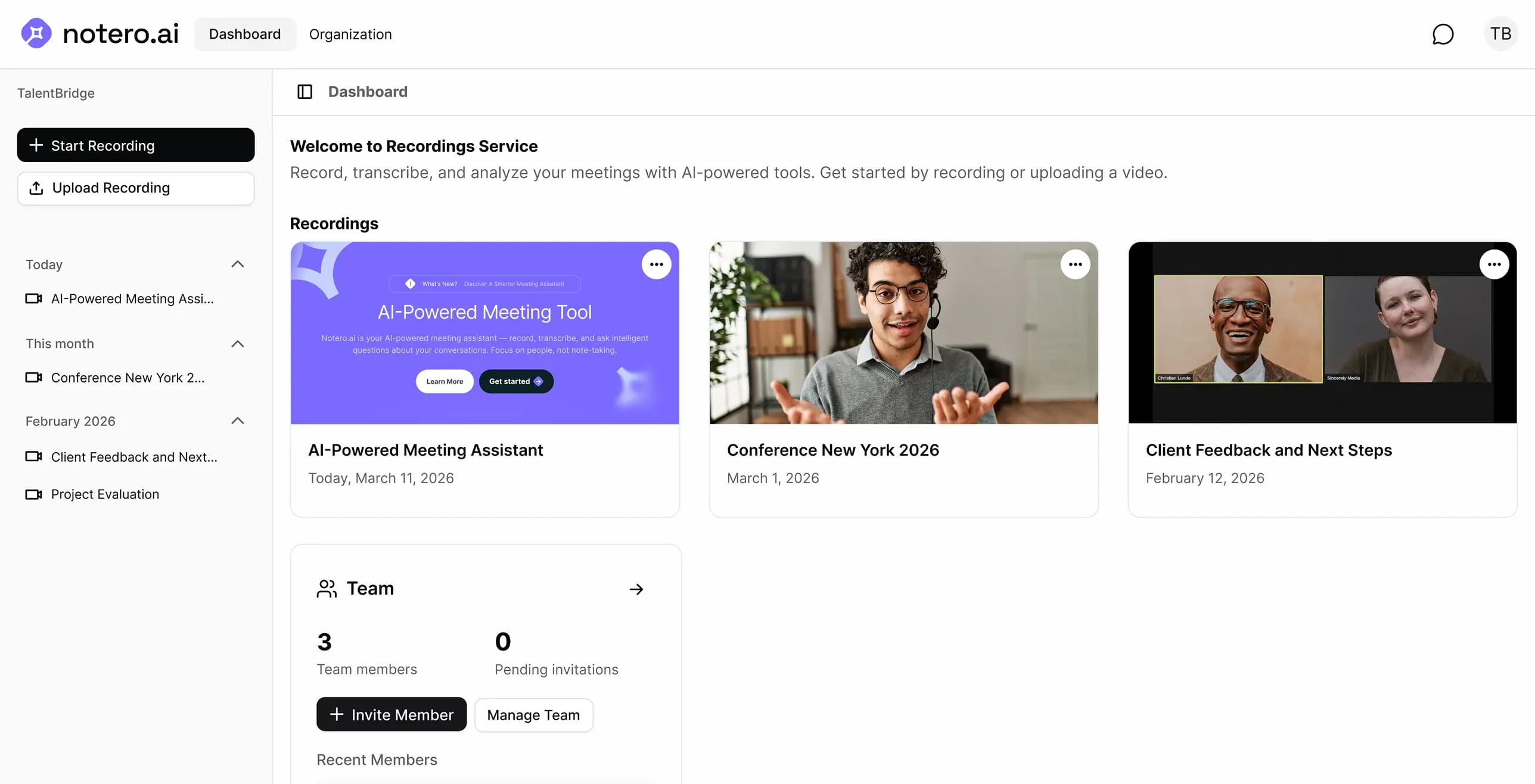
Notero uses advanced AI speech recognition to deliver highly accurate transcripts with speaker labels and timestamps. It supports 60+ languages and performs at a professional level in standard meeting conditions.
Yes. You can upload video or audio files directly to Notero. The AI will transcribe, summarize, and make them fully searchable - just like a live meeting.
Yes. Recordings are encrypted in transit (TLS) and at rest (AES-256) in AWS S3 in Frankfurt. The app and database run in London. Meeting bots capture video in Recall.ai's EU region (Frankfurt), then we store a copy in our S3 bucket. We do not sell your meeting content. Subprocessors such as Recall, Soniox, and OpenAI process data only to provide the Service — details are in our Privacy Policy.
The Free plan includes 300 credits that you can use for transcription, AI summaries, and the AI assistant. It's a great way to experience Notero and see how it fits into your workflow before upgrading.
After your meeting is recorded and transcribed, you can ask the AI assistant any question about the conversation. For example: "What action items were assigned?" or "What did Sarah say about the deadline?" — the AI searches your meetings and gives you an instant, accurate answer.
Yes. If you leave while someone else is still on the call, Notero will stay for up to 10 more minutes. This applies whether the remaining participant is a person or another meeting bot.